

Troubleshoot issues with your development setup
Issues with Installing the Recommended Prerequisites
Section titled “Issues with Installing the Recommended Prerequisites”Your operating system must support Node.js 24. On Windows, use WSL2.
It is recommended to research your specific issue on resources such as Google, Stack Overflow, and Stack Exchange. There is a good chance that someone has faced the same issue and there is already an answer to your specific query.
If you are on a different OS or are still facing issues, see getting help.
Performance and Stability Issues on WSL2 Linux Distro
Section titled “Performance and Stability Issues on WSL2 Linux Distro”If you are working on a WSL2 Linux Distro, you might get performance and stability issues by running this project in a folder which is shared between Windows and WSL2 (e.g. /mnt/c/Users/).
Therefore we recommend to clone this repo into a folder which is mainly used by your WSL2 Linux Distro and not directly shared with Windows (e.g. ~/PROJECTS/).
See Microsoft’s guidance for working across Windows and Linux file systems for more information.
Troubleshooting port issues on GitHub Codespaces
Section titled “Troubleshooting port issues on GitHub Codespaces”Sometimes the service on port 8000 does not go live. This is common when you restart an inactive codespace.
Start the two servers in separate terminals from the project root (/workspaces/freeCodeCamp):
pnpm run develop:apipnpm run develop:clientThis makes port 8000 available. Be mindful of how the URLs and ports work inside a GitHub Codespace.
The Ports panel lists port 8000 but the browser cannot open it
Section titled “The Ports panel lists port 8000 but the browser cannot open it”This happens in a Dev Container on your own machine, where the client can bind IPv6 loopback only. Stop the client, then start it with an explicit host:
GATSBY_HOST=0.0.0.0 pnpm run developUpdate your branch from upstream/main and rebuild the container to get this by default.
The client loads but every API request fails
Section titled “The client loads but every API request fails”This happens in a codespace when .env still points at localhost.
A browser tab inside a codespace cannot reach localhost. That address points at your own machine, not at the codespace.
-
From the project root (
/workspaces/freeCodeCamp), check the two values in.env:Terminal window grep -E '^(HOME_LOCATION|API_LOCATION)=' .envIn a codespace,
HOME_LOCATIONmust use the forwarded client URL, such ashttps://CODESPACE_NAME-8000.app.github.dev.API_LOCATIONmust use the forwarded API URL, such ashttps://CODESPACE_NAME-3000.app.github.dev. -
If they still use
localhost, run the codespace environment script again from the same directory:Terminal window .devcontainer/codespace-env.sh -
Stop the process that is running the client, then restart it with the same command. If you started the application with
pnpm run develop, run:Terminal window pnpm run develop -
Set port
3000to public. In the Ports panel, right click port3000, then choose Port Visibility > Public.The container sets this on every start. Do this yourself only if it reported that it could not.
Issues with Missing UI, Fonts, Language Strings, or Build Errors
Section titled “Issues with Missing UI, Fonts, Language Strings, or Build Errors”When you build the client, Gatsby will cache the fonts, language strings, and UI. If one of them isn’t cached, run the following:
pnpm run cleanpnpm installpnpm run seedpnpm run developOr use the shorter command, which runs the clean, install, and develop steps:
pnpm run clean-and-developThis command does not seed the database. Run pnpm run seed separately if you need to recreate the development users and data.
If you continue to face issues with the build, cleaning up the workspace is recommended.
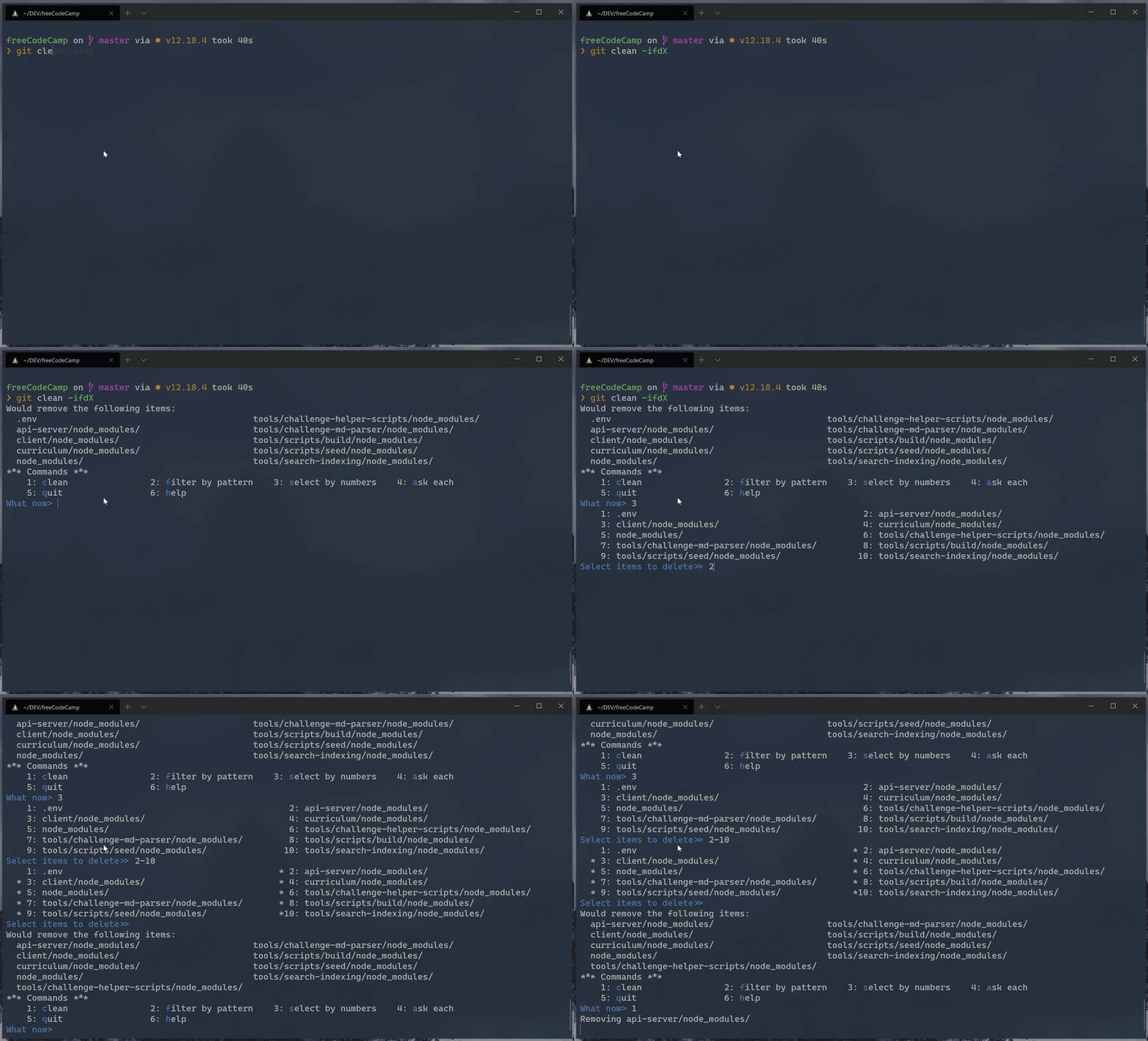
Use git clean in interactive mode:
git clean -ifdXHow to clean git untracked files (screenshot)
Issues with API, login, Challenge Submissions, etc.
Section titled “Issues with API, login, Challenge Submissions, etc.”If you can’t sign in, and instead you see a banner with an error message saying that the error will be reported to freeCodeCamp, please double-check that your local port 3000 is not in use by a different program.
From Terminal:
Section titled “From Terminal:”netstat -a | grep "3000"Check the output:
tcp4 0 0 0.0.0.0:3000 DESKTOP LISTENIssues Signing Out while Navigating
Section titled “Issues Signing Out while Navigating”While in development, your session is stored as cookies. Clearing them will sign you out of your development account.
Running pnpm run seed:certified-user will log you out, too. It will overwrite the development user in your local database.
Issues Installing Dependencies
Section titled “Issues Installing Dependencies”If you get errors while installing the dependencies, please make sure that you are not in a restricted network or your firewall settings do not prevent you from accessing resources.
Working With Other Languages
Section titled “Working With Other Languages”To see how the client renders in another language go to How to Work on Localized Client Webapp.
Getting Help
Section titled “Getting Help”If you are stuck and need help, feel free to ask questions in the ‘freeCodeCamp Community’ category on our forum or the contributors chat room.
There might be an error in the console of your browser or in Bash / Terminal / Command Line that will help identify the problem. Provide this error message in your problem description so others can more easily identify the issue and help you find a resolution.